Computer Network Theory MID

Muhaiminul Sir Notes:
downloads link:CN_mid-notes.pdf
CT and Mid Term Preparation:(Question and Math Solve)
Link:sayeem Bhaiya Notes:https://sayeemzzzaman.hashnode.dev/cn-mid
Lecture 01:
Why should we learn Computer Networks ?
Answer: For Designing, managing and Securing Interconnected Systems build , understand and optimize the communication
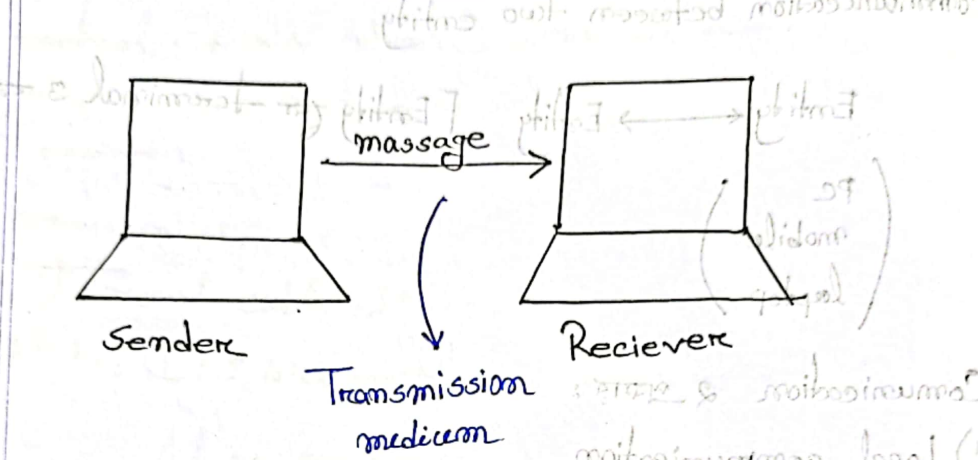
To Communicate Data there are two components
1)Source
2)Destination
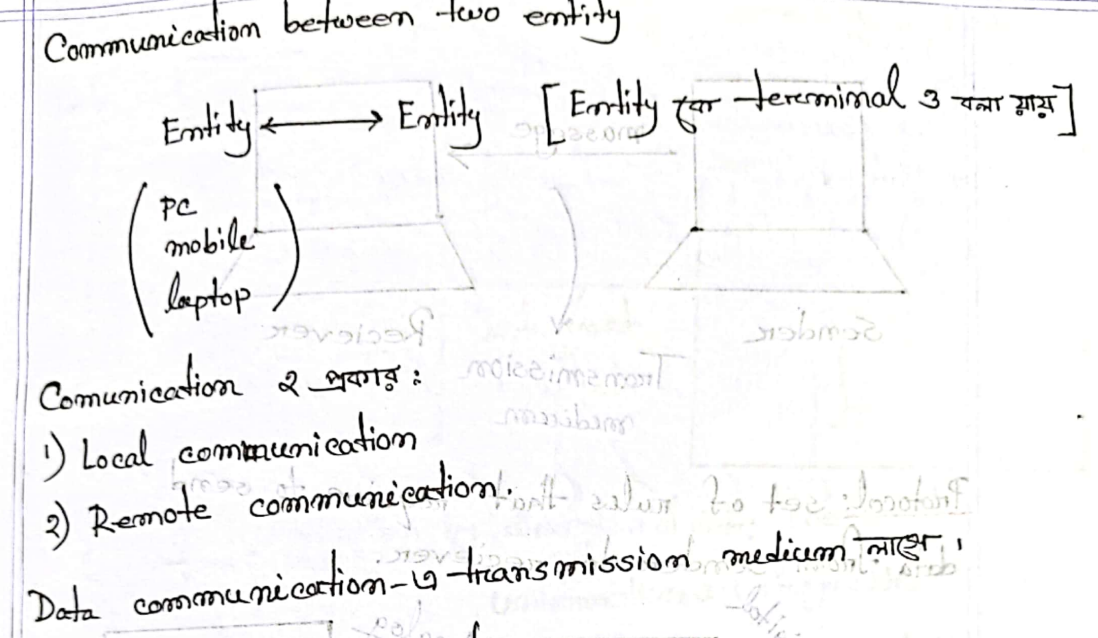
There are two types of communication
Local
Destination
To communicate the data transmission there need a medium
Effective Data communication:
Delivery: Ensuring accuracy in reaching the intended destination. This involves confirming that the data sent from the sender reaches the receiver without errors or loss, and at the correct endpoint.
Accuracy: Refers to the integrity of the transmitted data. It involves preventing data corruption or loss during transmission. Accurate data transmission ensures that the information received at the destination is the same as what was sent by the sender.
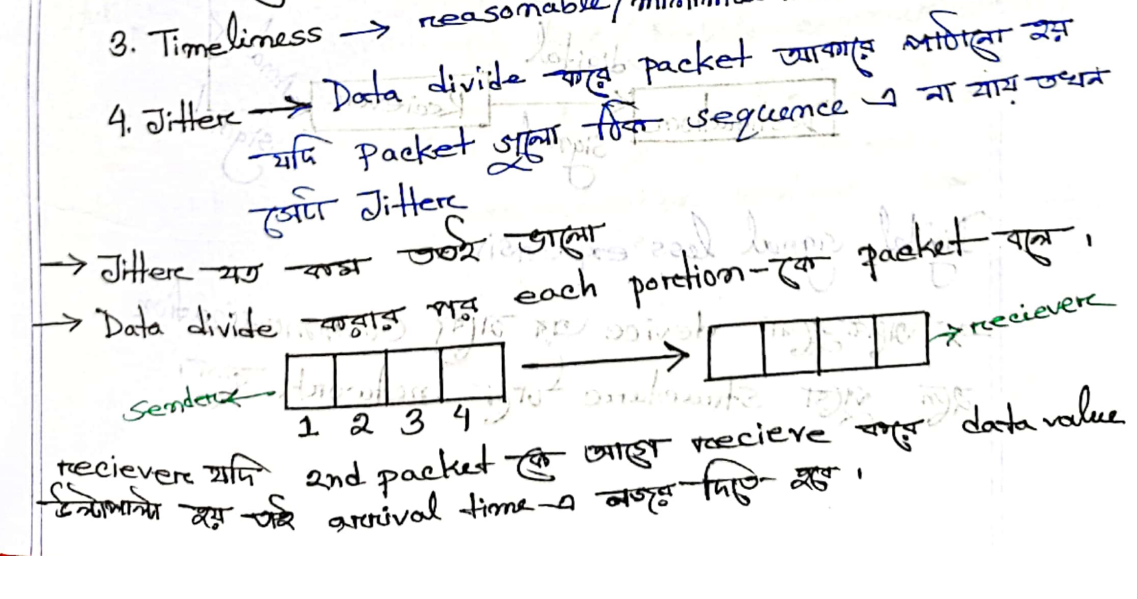
Timeliness: The goal is to achieve reasonable or minimal time for data transmission. Timeliness is crucial for real-time applications and services, ensuring that the data reaches its destination promptly. Delays can impact the effectiveness and performance of certain applications.
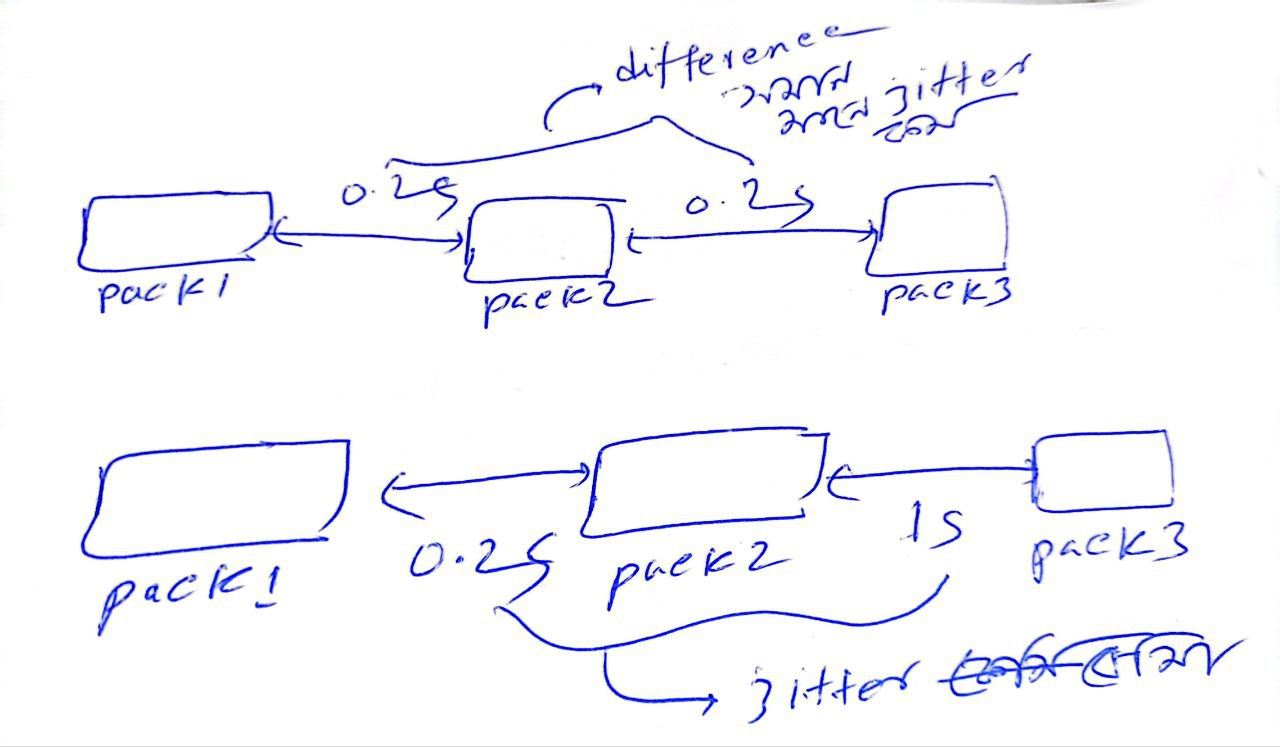
Jitter: Jitter is the variation in the time it takes for packets to reach the destination. In the context of data transmission, it refers to the inconsistency in the arrival time of data packets. Minimizing jitter is essential for applications that require a steady and predictable flow of data, such as voice and video communication.
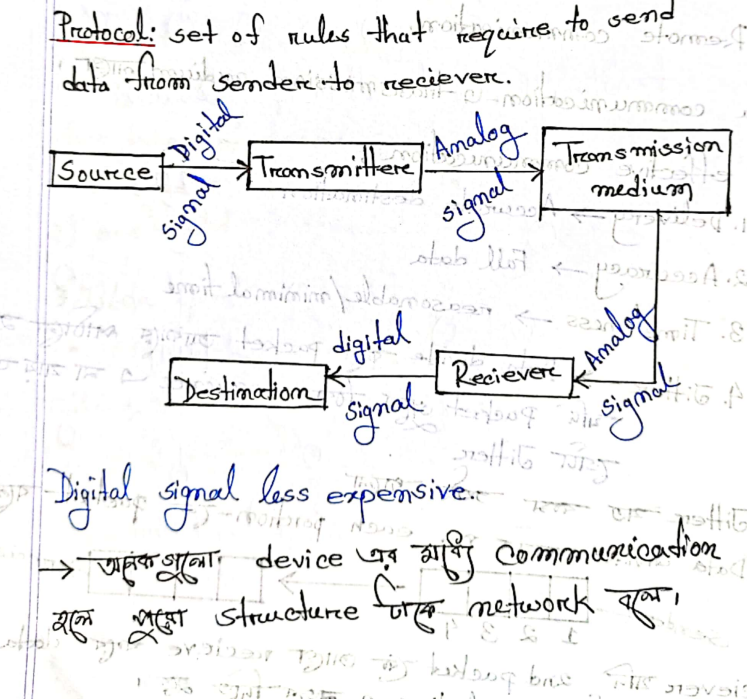
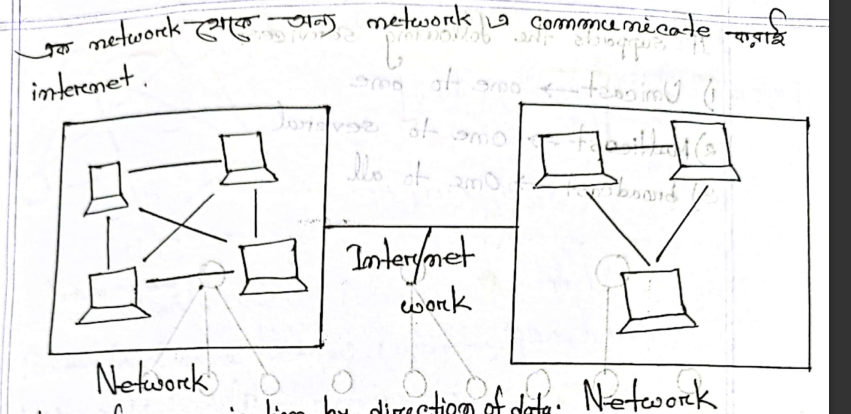
Communication Model:
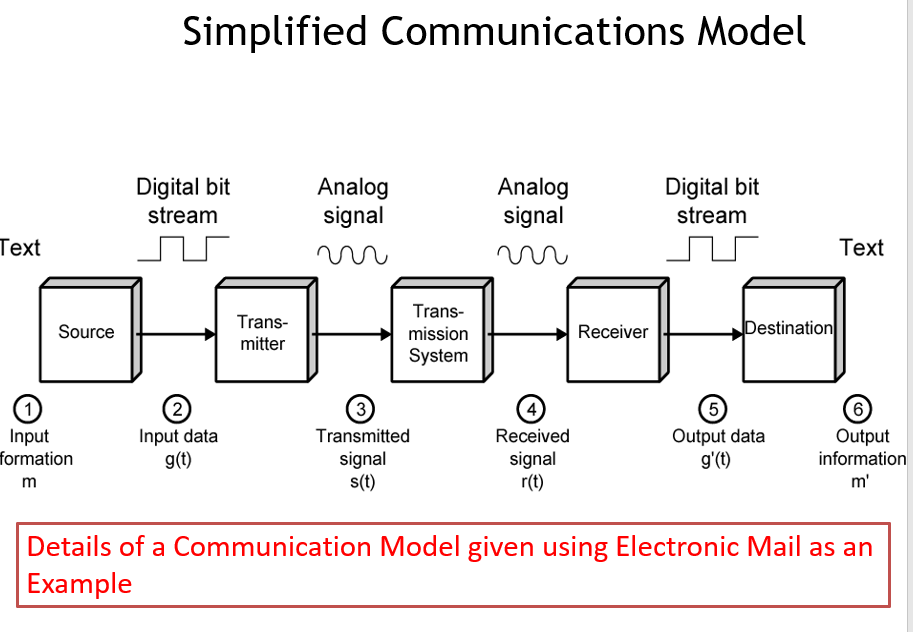
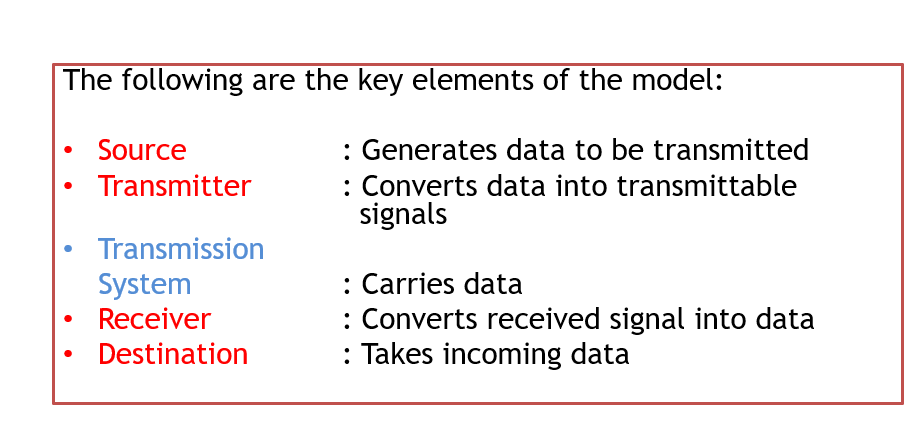
The communication links are established through various
•Equipment/Hardware
•Software.
The requirements of equipment and software depend on
•Type of signal
- Analog (e.g. voice) or Digital (binary data)
Communication channel
The communication path between two devices through which data are transmitted .Capacity is measured in terms of bandwidth and speed of transmission. The basic building block of any communications facility is the transmission medium. It is the physical link between the transmitting and the receiving equipment. One of the basic choices facing a business user is the Transmission Medium.
–Internal use entirely up to business
–Long-distance links made by carrier
•Rapid technology advances change mix media used
–Twisted pair - 10 Mbps – 100 Mbps
–Coaxial Cable – 10 Mbps
–Fiber optic – 1 Gbps
–Wireless – 10 Mbps – 500 Mbps
Communication Task
Transmission System Utilization: Optimizing the use of the transmission medium to ensure efficient data transfer and minimize congestion.
Interfacing: Establishing compatibility between different hardware or software components to enable seamless communication.
Signal Generation: Creating appropriate signals for transmission, ensuring they can be effectively interpreted at the receiving end.
Synchronization: Ensuring synchronization between sender and receiver in terms of timing and data flow to prevent errors and data loss.
Exchange Management: Handling the initiation, maintenance, and termination of communication sessions or exchanges between devices.
Error Detection: Implementing mechanisms to identify and correct errors during data transmission to enhance communication reliability.
Flow Control: Regulating data flow between sender and receiver to prevent congestion and ensure smooth communication.
Utilization: Efficiently using available resources, such as bandwidth or processing power, to maximize communication system performance.
Routing: Determining the optimal path for data to travel through a network, ensuring timely and reliable delivery.
Message Forwarding: Passing messages or data packets through intermediate devices to reach the intended destination in a network.
Security: Implementing measures to protect data and communication channels from unauthorized access, ensuring confidentiality, integrity, and availability.
Network Management: Overseeing and controlling network resources, addressing issues, and optimizing performance for a smooth and reliable operation.
Logical Address:
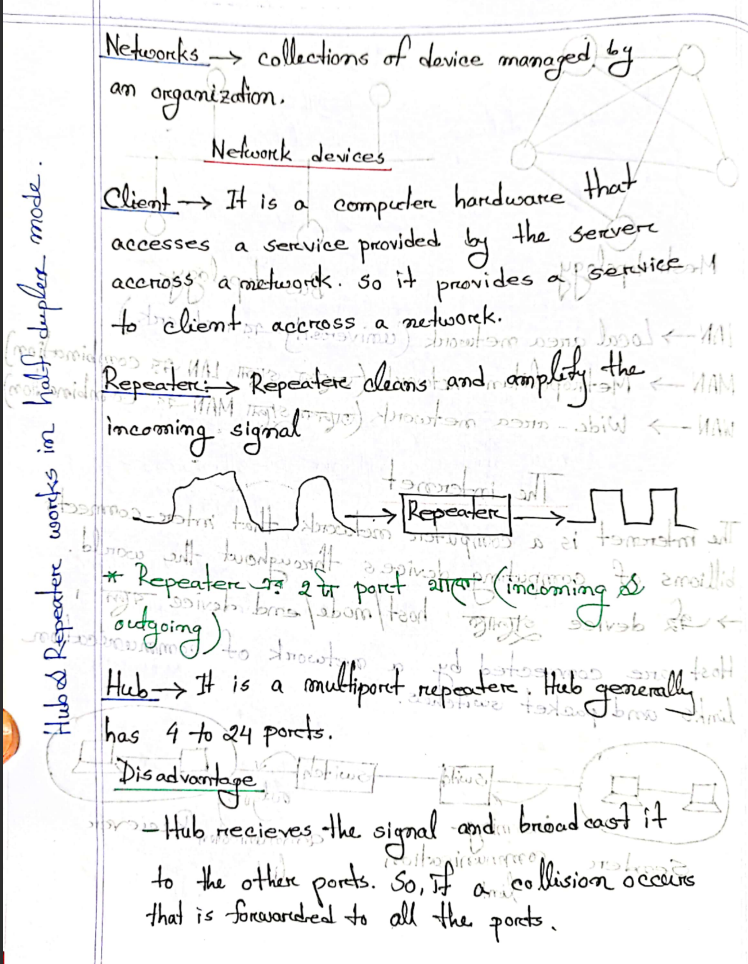
Logical addressing is related to network addressing. In networking, logical addresses are used to identify devices in a network uniquely. Examples of logical addresses include IP addresses (IPv4 or IPv6). Routers work at the network layer (Layer 3 of the OSI model) and use logical addresses to make routing decisions.
Physical Address:
Physical addressing is related to hardware addressing.
In networking, physical addresses are also known as MAC addresses (Media Access Control addresses).
MAC addresses are unique identifiers assigned to network interfaces at the data link layer (Layer 2 of the OSI model).
Switches operate at the data link layer and use MAC addresses for forwarding frames within a local network.
In summary:
Logical addresses, such as IP addresses, are used for network layer routing and higher-level communication.
Physical addresses, like MAC addresses, are used for data link layer communication within a local network.
Routers primarily deal with logical addressing, and switches primarily operate with physical (MAC) addresses. Both types of addresses serve different purposes in networking.
Network Criteria:
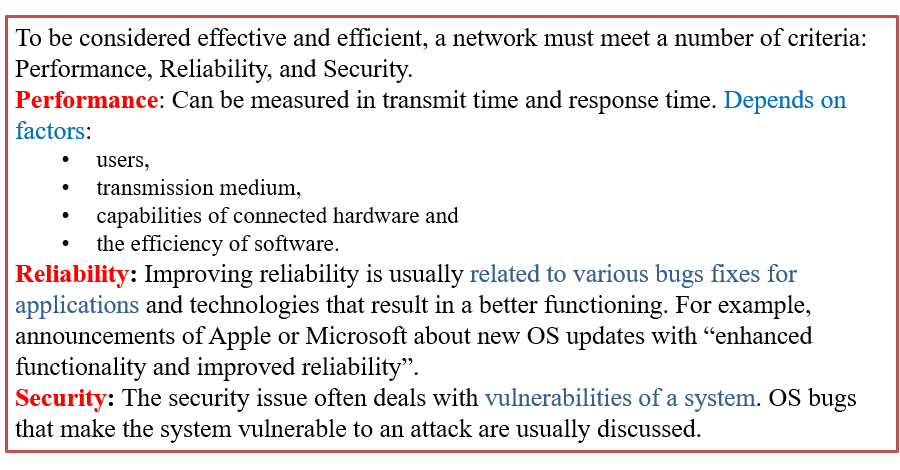
1)Response Time:
The time it takes for a system to react to a given input. It depends on user expectations and the efficiency of the network and system. i)Transmission Medium: Refers to the physical path through which data travels in a network. It could be wired (e.g., coaxial cables, fiber optics) or wireless (e.g., radio waves, microwaves).
ii)Connect to Hardware: Networks should be able to connect various hardware devices, such as computers, printers, servers, etc.
iii)Efficiency of Software: The performance and effectiveness of the software running on the network, including protocols and applications.
2)Reliability: Ensures that data is reliably and accurately delivered to the intended recipient. Reliable data transmission is crucial for network functionality.
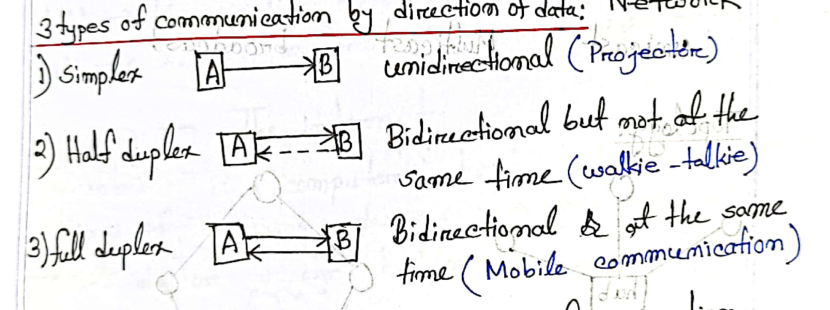
Direction of Data Flow:
Transmission Model: Describes the direction in which data can travel between devices. Three main transmission models are simplex, half-duplex, and full-duplex.
Simplex: Data can only travel in one direction. Communication is unidirectional, like a one-way street.
Half Duplex: Data can travel in both directions, but not simultaneously. Devices take turns sending and receiving.
Full Duplex: Data can flow in both directions simultaneously. This allows for more efficient and faster communication.
Lecture 02 :
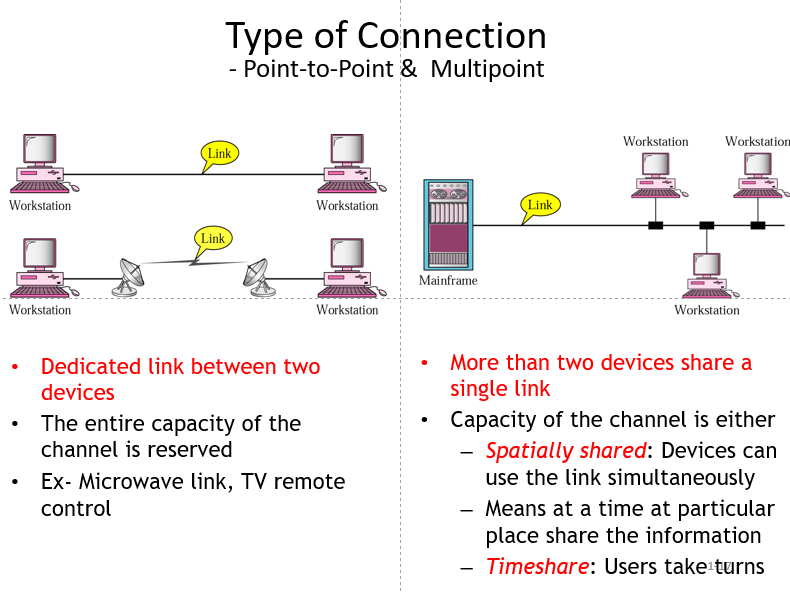
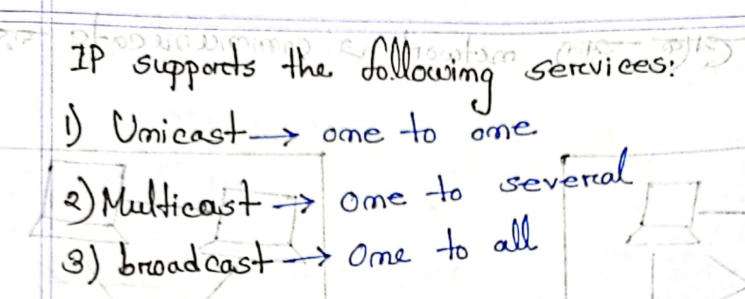
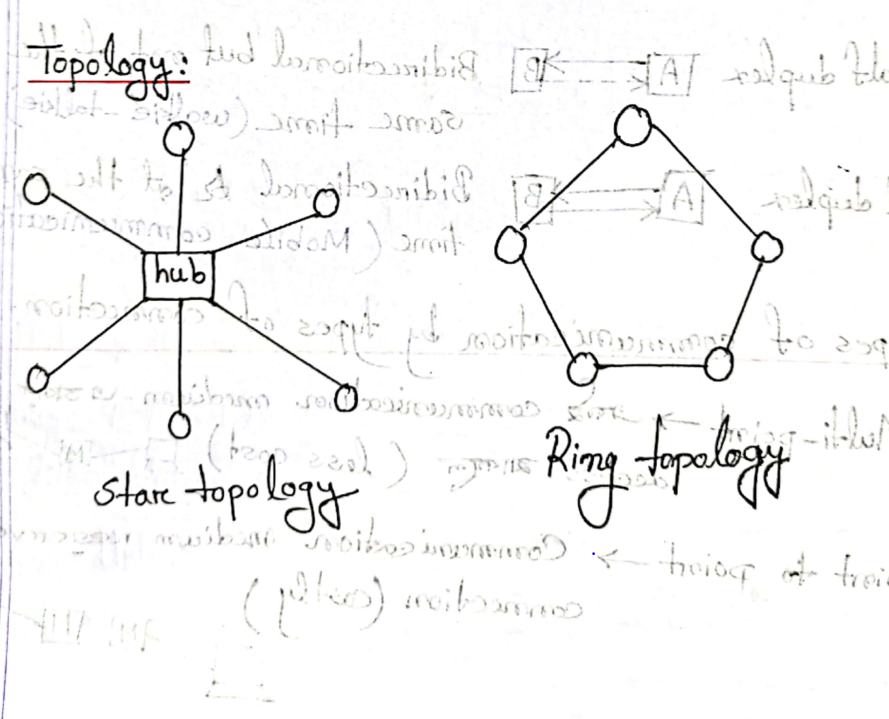
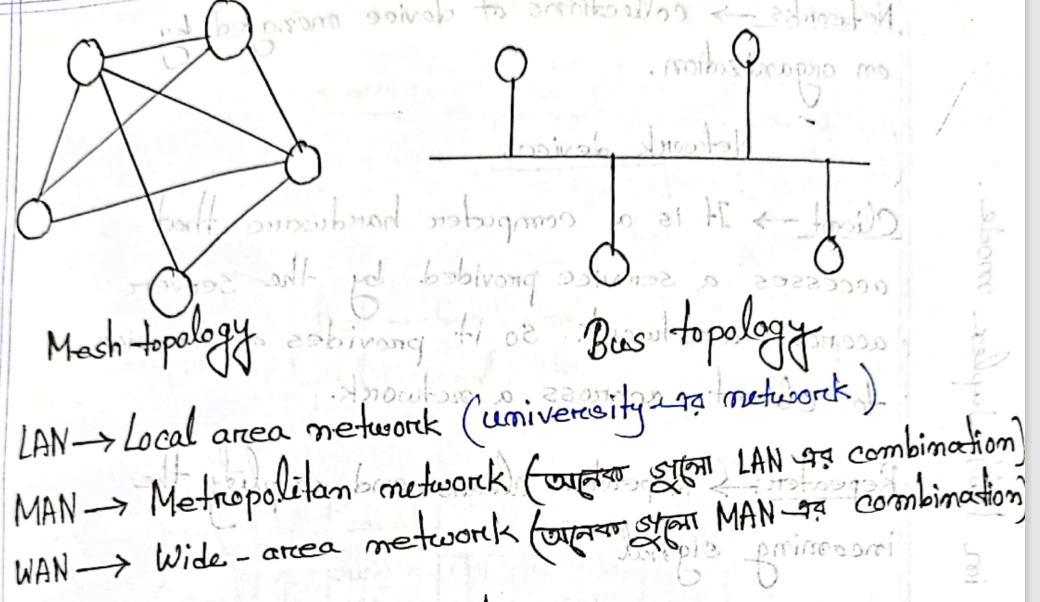
An example of a MAN network distribution is connecting cities, such as Dhaka to Khulna .
An example of WAN network distribution involves connecting countries, such as linking Bangladesh to the USA.
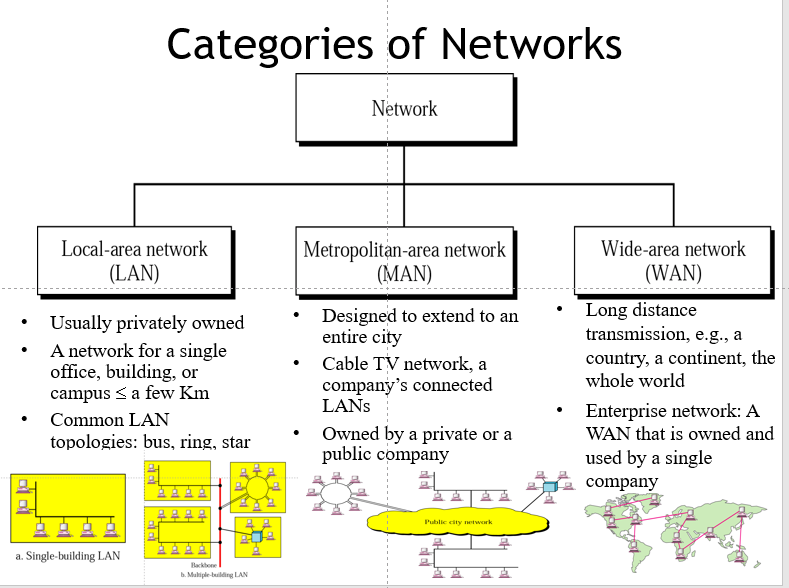
•Traditionally, Wide Area Networks have been implemented using one of two technologies:
–Circuit switching
–Packet switching
•Subsequently, the following two played major roles
–Frame relay
–Asynchronous Transfer Mode (ATM)
Circuit Switching
Dedicated Communications Path:
Established between two stations through network nodes.
Path is a connected sequence of physical links between nodes.
Logical Channels:
- Each link has a dedicated logical channel for the connection.
Data Transmission:
Source station's data transmitted along the dedicated path.
Emphasis on rapid data transmission.
Example of Circuit Switching:
- Telephone network is a primary example.
Transition to New Technologies:
Circuit switching gradually succeeded by services based on gigabit Ethernet.
Adoption of Internet Protocol technologies.
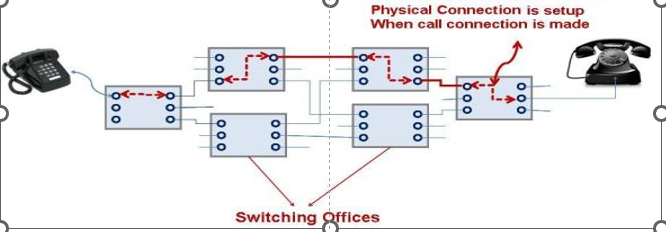
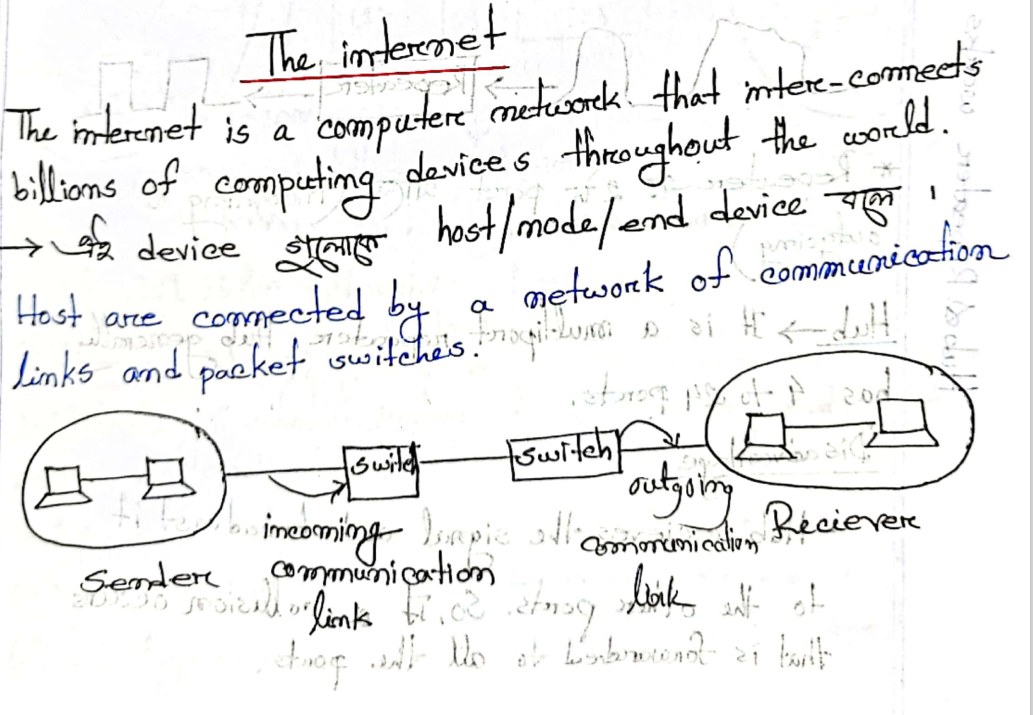
Certainly! In circuit switching, it's like having a dedicated highway between two places. Cars (data) from one place travel along this highway without sharing the road with others. Each section of the highway has its own lane, exclusively for our cars (data packets). The aim is to get these cars from one place to the other as quickly as possible. Think of the telephone network as a great example of this. When you make a call, a dedicated connection is established for the conversation. However, as technology advances, we're moving toward using more versatile highways, like the Internet, where data packets from different sources share the road and take various routes to reach their destination.
So, in a nutshell, circuit switching is like having your private expressway for data, and it's gradually making room for more efficient and flexible networks.
Packet switching
Packet Switching
Transmission Capacity:
- Not necessary to dedicate transmission capacity along a path.
Data Transmission:
Sent in small chunks known as packets.
Passed from node to node along a path from source to destination.
Common Uses:
- Commonly used for terminal-to-computer and computer-to-computer communications.
Internet Protocol:
- The Internet is based on a packet-switching protocol, TCP/IP.
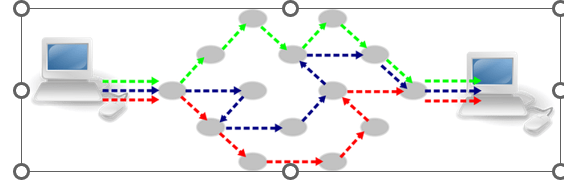
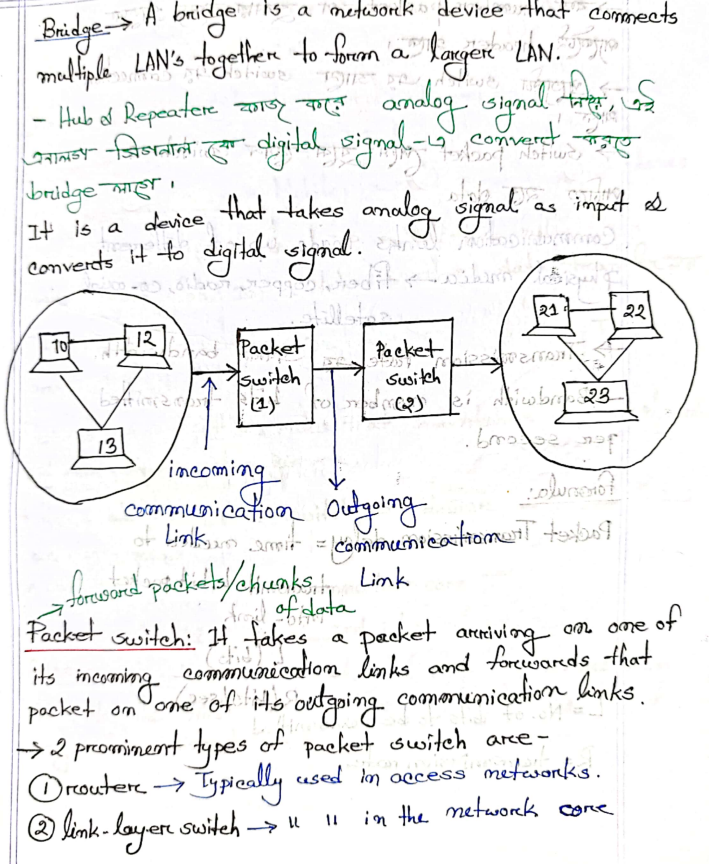
In packet switching, it's unlike the traditional way where we don't need to reserve a whole road for our information. Instead of sending data in one go, we break it into small pieces called packets. These packets travel from one stop to another on a path that goes from where we start to where we want the data to end up.
Packet switching is like passing a message through a relay race, where each runner carries a part of the message. It's commonly used when our devices talk to each other, like when you use a computer or connect to the internet. Speaking of the internet, it works on a packet-switching protocol called TCP/IP.
Lecture 03:
Frame Relay:
There are two types of packet switching
-Frame Relay
-Asynchronous Transfer Mode(ATM)
Frame Relay: Frame Relay turns physical interface in virtual Interfaces
Required no of connections=(N*(N-1))/2
N :numbers of routers
Frame Relay is a packet-switching technology operating at the data link layer, designed for efficient data transmission over wide area networks. It utilizes variable-sized frames and virtual interfaces to achieve high data rates up to 2 Mbps while minimizing overhead. Though once widely used, newer technologies like MPLS have since gained prominence in modern network infrastructure.
Advantages of Frame Relay:
Frame Relay was developed to take advantage of high data rates and low error rates in modern transmission facilities.
It operates at data rates of up to 2 Mbps.
Overhead Reduction in Frame Relay:
- To achieve high data rates, Frame Relay focuses on stripping out most of the overhead associated with error control.
Virtual Interfaces:
- Frame Relay transforms physical interfaces into virtual interfaces, providing a more efficient and streamlined approach to data transmission.
In summary, Frame Relay is designed to optimize data transmission in the context of modern, high-speed, and low-error-rate digital communication networks. It achieves this by minimizing overhead and turning physical interfaces into virtual ones for more efficient communication.
Asynchronous Transfer Mode(ATM):
Asynchronous Transfer Mode (ATM) is a high-speed, cell-based switching technology that efficiently transports data, voice, and video through networks. It utilizes fixed-size cells for uniform and predictable data transfer, making it suitable for diverse types of traffic in telecommunications networks.
Asynchronous Transfer Mode (ATM):
Referred to as cell relay.
Evolution from frame relay.
Culmination of Developments:
- Integrates developments in circuit switching and packet switching.
Fixed-Length Packets (Cells):
- Uses fixed-length packets called cells, which helps in reducing overhead.
Data Rate:
- Operates in the range of 10s and 100s of Mbps and in the Gbps range.
Dynamic Data Rate:
- Allows multiple channels with the data rate on each channel dynamically set on demand.
Fixed Routes:
ATM creates fixed routes between two points before data transfer begins.
In contrast, TCP/IP (used in the Internet) divides data into packets, and each packet takes a different route to reach its destination.
Layered Models
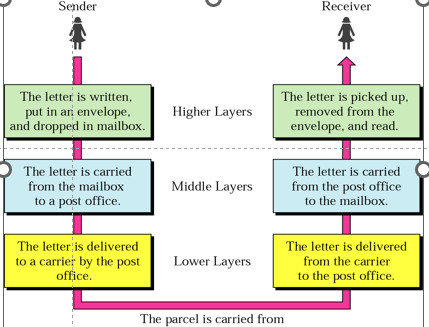
Digital Equipment Corporation (DEC), established in 1957, was a significant computer company, ranking as the second-largest globally after IBM (established in 1924). In the early stages, DECnet and IBM systems couldn't communicate. To address this, in the late 1970s, the Open Systems Interconnection (OSI) reference model was developed by the International Organization for Standardization (ISO). This model serves as a conceptual blueprint for communication, breaking down processes into logical layers. Designing a communication system based on this model is known as layered architecture.
The OSI Model
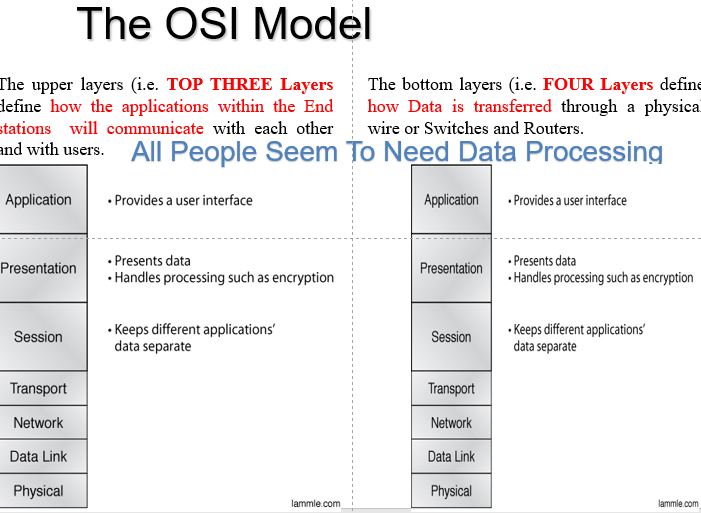
Introduction to OSI layer :
The OSI (Open Systems Interconnection) model is a conceptual framework that standardizes the functions of a telecommunication or computing system into seven abstraction layers. These layers, from the physical transmission of bits to the user interface, work together to ensure seamless communication in computer networks. Here's a brief introduction to the OSI layers:
Physical Layer: This is the lowest layer, dealing with the physical connection between devices. It defines the hardware components, such as cables and connectors, and how bits are transmitted over the network medium.
Data Link Layer: Responsible for creating a reliable link between two directly connected nodes. It frames the bits into frames, handles error detection, and manages access to the physical medium.
Network Layer: Focuses on the logical addressing and routing of data packets between different networks. It enables devices to find the best path for data transmission across multiple networks.
Transport Layer: Manages end-to-end communication and ensures that data is delivered error-free and in the correct order. It also handles flow control and error recovery.
Session Layer: Establishes, maintains, and terminates sessions or connections between applications. It manages dialogue control and allows data exchange between different applications.
Presentation Layer: Translates data between the application layer and the lower layers. It is responsible for data formatting, encryption, and compression to ensure compatibility between different systems.
Application Layer: This is the topmost layer that interacts directly with end-user applications. It provides network services directly to end-users and enables communication between software applications.
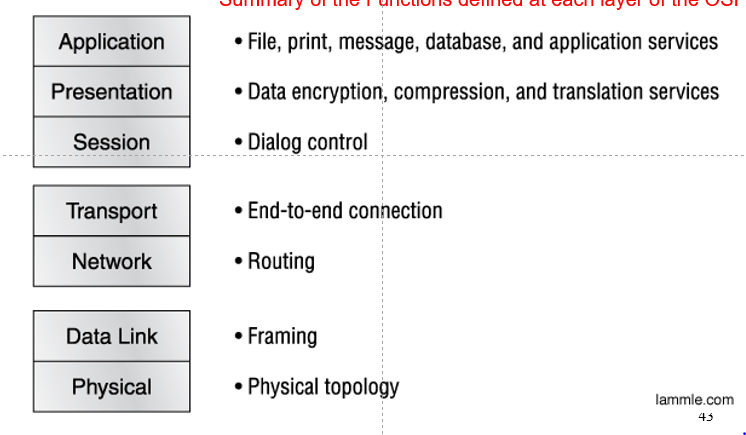
Peer-to-Peer Processes Overview:
When sending a message from one device (let's call it A) to another (B) in a peer-to-peer network: The "middle" devices involved handle Layers 1 to 3 only. Within a single device, each layer asks for help from the layer directly beneath it. When communicating between devices, they use the same layers. Layers and Their Roles: Group 1: Layer 5 (Application): This layer helps different software understand each other. Group 2: Layer 4: Connects Group 1 (Layer 5) and Group 3 (Layers 1-3) to make sure the data passed between them is easy to read. Group 3: Layers 1 to 3: These layers handle the physical movement of data between devices, providing network support.
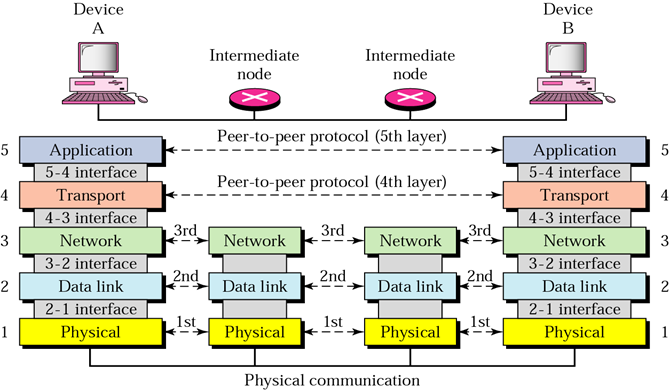
Exchange using the Internet Model:
Overview:
The process begins at Layer 5 and moves sequentially downward through the layers. At each layer, a header (Hx) is added to the data unit (Lx). When the data unit reaches Layer 1, it's transformed into an electromagnetic signal and sent along a physical link.
Layer-by-Layer Explanation:
Layer 5 (Application): This is where the process starts. The application layer deals with software applications and user interactions.
Layer 4 (Transport): Adds a header (H4) to the data unit (L4). Responsible for ensuring the reliable delivery of data between devices. Layer 3 (Network): Adds a header (H3) to the data unit (L3). Handles routing and forwarding of data packets across networks.
Layer 2 (Data Link): Adds a header (H2) and trailer (T2) to the data unit (L2). Organizes data into frames for transmission over the physical link. Layer 1 (Physical): Transforms the formatted data unit into an electromagnetic signal. Sends the signal along a physical link (e.g., cables, wireless transmission). This sequential process ensures that data is properly formatted, transmitted, and received across the network.
Lecture 04:
Networking Layers:
Application Layer: Deals with data.
Transport Layer: Segments data and includes error detection.
Network Layer: Manages data in packets.
Data Link Layer: Organizes data in frames.
Physical Layer: Represents data in bits.
IP Addresses:
Two Types: IPv4 and IPv6.
IPv4 are 32 bits (192.168.0.1 each bits are 8 bits(192->8 bits)
so total bits will be 8+8+8+8=32 bits
IPV6 are 128 bits
Example (IPv4): 192.166.0.2
Breakdown: 192.166.0: (Network), 2: (Host)
Calculation: 2^8 - 2 = 254 addresses in this network.
here -2 will be the broadcast address
Another Example: 192.168.0.1/24
Broadcast Address: 192.168.0.255
if you don't know the IP address then we should know Broadcast address
IPv4 Subnetting:
Example: 192.168.10.65/26
Number of Networks: 32-26 = 6
Addresses per Network: 2^6 - 2 = 62
Private IP Addresses (LAN):
Class A:10.000-10.255.255.255
Ports: 10.000/8
- 24 port will be use
Class B:172.168.0.0 - 172.31.255.255
- Subnet: 172.168.0.0/12
Class C:192.168.0.0 - 192.168.255.255
- Subnet: 192.168.0.0/16
Subnet Mask:
Example: 192.168.0.0/16
- Subnet Mask:255.255.0.0
Network Components:
Network Edge: Involves hosts and devices.
Network Core: Deals with how data is transferred and connected.
Performance Metrics:
- Include: Loss, delay, throughput.
Host:
- Sends packets of data.
Access Network:
Definition:
An access network is the part of a telecommunications system that connects end-users (subscribers) to the main network, facilitating the exchange of data, voice, or other services. It includes technologies like DSL, cable modem, fiber optics, wireless, and Ethernet, depending on the infrastructure and requirements.Flow Control: Flow control is a mechanism that manages the data transfer rate to prevent overwhelming the receiving end. It ensures that the sender doesn't flood the receiver with more data than it can handle, avoiding congestion and data loss. Flow control is crucial for maintaining a smooth and efficient communication process.
Transmission Capacity: Transmission capacity refers to the amount of data that can be delivered per channel or communication link. It's like the channel's bandwidth, indicating how much information can be transmitted within a given time frame. Managing transmission capacity is essential for optimizing data transfer and preventing bottlenecks in the network.
Transmission Delay: Transmission delay occurs when data cannot be delivered immediately. It is the time it takes for data to travel from the sender to the receiver. Factors contributing to transmission delay include propagation delay (time for signals to travel through the medium) and queuing delay (time spent in queues, waiting for transmission). Reducing transmission delay is important for improving overall network efficiency.
It seems like your notes touch on protocols and various communication methods. Here's a refined version:
Protocols: Protocols are sets of rules that define how data is transmitted and received in a network. They ensure standardized communication between devices, allowing them to understand and interpret each other's messages. Protocols play a crucial role in enabling effective and reliable data exchange.
Three-Way Handshaking: Three-way handshaking is a communication process used in network protocols to establish a connection between two devices. It involves three steps:
Initialization (SYN): One device sends a synchronization request to initiate communication.
Acknowledgment (SYN-ACK): The receiving device acknowledges the request and agrees to establish a connection.
Confirmation (ACK): The initial device acknowledges the acknowledgment, and the connection is established.
Three-way handshaking is fundamental for establishing reliable and synchronized communication between devices.
FDMA, TDMA, CDMA: These are multiple access techniques used in communication systems:
FDMA (Frequency Division Multiple Access):
In FDMA, different users or channels are assigned distinct frequency bands.
Each user communicates over a separate frequency, minimizing interference.
TDMA (Time Division Multiple Access):
TDMA divides the available time into slots, and each user is allocated a specific time slot.
Users take turns transmitting, making efficient use of the available time.
CDMA (Code Division Multiple Access):
CDMA assigns a unique code to each user, allowing multiple users to share the same frequency.
Codes are used to separate and distinguish between different transmissions.
These multiple access techniques are essential for efficiently utilizing communication resources in various types of networks.
Network core: Mesh of interconnected routers .
Network Core Functions: The network core serves as the backbone of a network, facilitating the exchange of data between different devices. Several key functions contribute to its operation:
Forwarding: Forwarding involves the immediate delivery of data from the input interface to the appropriate output interface within a router or switch. It's the basic function that gets data packets moving through the network.
note :add silde no 40
Routing: Routing is the process of determining the optimal path for data to travel from the source to the destination. It involves selecting the most efficient route based on network conditions, ensuring timely and reliable data transmission.
note :add silde no 39
Packet Switching (Store and Forward):
Store and Forward: In packet switching, the store-and-forward approach involves receiving the entire data packet at a router before it is transmitted to the next link. This ensures the integrity of the packet before forwarding.
Packet Transmission Delay: The time it takes to transmit a packet is influenced by the length of the packet (L) and the transmission rate (R). The delay (L/R) represents the time it takes to push out L bits of a packet into a link at a rate of R bits per second.
In summary, forwarding and routing guide the movement of data within the network, while packet switching, with the store-and-forward method, ensures efficient and reliable transmission through the network core. The packet transmission delay is influenced by the size of the packet and the transmission rate.
Queuing: Queuing refers to the process of holding packets in a queue (or buffer) at a network node, typically a router, before they are forwarded to the next destination. Queues are essential to manage the flow of data in a network, especially when the rate of incoming packets exceeds the rate at which the router can forward them. Key points related to queuing include:
Buffering: Routers have buffers to temporarily store incoming packets when the outbound link is busy. Queues help handle variations in packet arrival rates and prevent packet loss during congestion.
Queue Management: Various algorithms and strategies are used for managing queues, such as First-In-First-Out (FIFO), Priority Queueing, and Random Early Detection (RED). These techniques aim to optimize packet flow and reduce delays.
Congestion Control: Queuing is closely related to congestion control. By intelligently managing queues, routers can handle traffic efficiently, avoid network congestion, and ensure smooth data flow.
In summary, packet switching involves breaking data into packets for efficient transmission, and queuing plays a crucial role in managing these packets at routers, helping to handle congestion and ensure a smooth flow of data through the network.
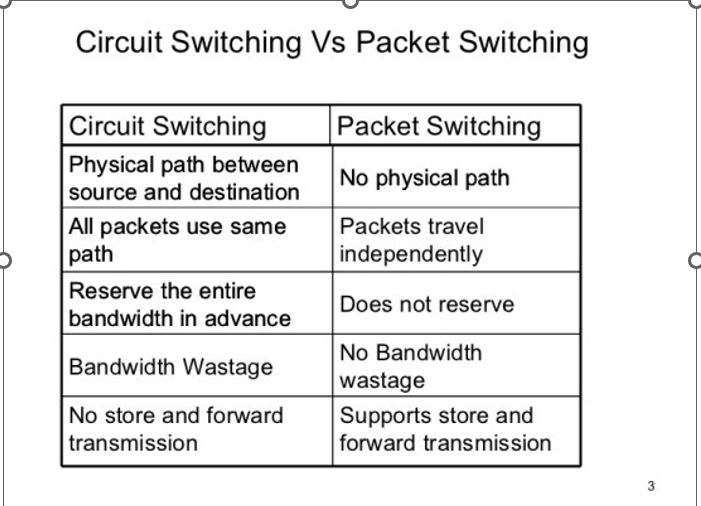
Packet switching is considered more efficient than traditional circuit switching for several reasons:
Resource Sharing:
Circuit Switching: In circuit-switched networks, a dedicated communication path is established between two parties for the entire duration of the communication, even if there is no data being transmitted. This leads to inefficient use of resources.
Packet Switching: With packet switching, network resources are shared dynamically. Data is divided into packets, and each packet can take its own route through the network. This allows for better utilization of available bandwidth as resources are used only when there is actual data to transmit.
Flexibility and Adaptability:
Circuit Switching: Fixed paths are established for the entire duration of the communication, making it less adaptable to changing network conditions.
Packet Switching: Packets can take different routes to reach the destination, adapting to changes in network conditions, avoiding congested paths, and providing a more resilient and flexible communication system.
Improved Utilization of Network Capacity:
Circuit Switching: Resources are reserved for the entire duration of the communication, leading to potential underutilization during periods of silence.
Packet Switching: The network can handle multiple conversations simultaneously, and unused capacity on a link can be utilized by other data streams.
Fault Tolerance:
Circuit Switching: A failure in the dedicated path can result in communication disruption until an alternative path is established.
Packet Switching: Since packets can take multiple routes, network failures or congestion on one path do not necessarily disrupt the entire communication. Packets can find alternative routes, enhancing fault tolerance.
Scalability:
Circuit Switching: Scaling a circuit-switched network to accommodate more users can be challenging as it requires establishing dedicated paths for each communication.
Packet Switching: Packet-switched networks are more scalable as they can efficiently handle a large number of users, and resources are allocated dynamically based on demand.
In summary, packet switching is more efficient because it can share resources dynamically, adapt to changing conditions, utilize network capacity more effectively, provide fault tolerance, and scale more easily to accommodate a growing number of users and data traffic.
Lecture 05:
Packet delay in a data network consists of several components, each contributing to the overall time it takes for a packet to travel from the source to the destination. The four main components of packet delay are:
Transmission Delay:
Definition: The time it takes to push all the bits of a packet onto the link.
Formula: Transmission Delay (Td) = Packet Length (L) / Transmission Rate (R)
Explanation: This delay is influenced by the packet's size and the link's transmission rate. A larger packet or a slower transmission rate will result in a longer transmission delay.
Queueing Delay:
Definition: The time a packet spends in a queue (buffer) at a network node, waiting to be transmitted.
Causes: Queueing delay occurs when the outgoing link is busy, and packets have to wait in a buffer before being transmitted.
Management: Queue management algorithms are used to control and optimize the flow of packets in the queue.
a-> average packet arrival rate
L:packet length(bits)
R->Link bandwidth (bit transmission rate)
L.a/R
Average arrival rate of bits in Queue/Transmission rate,(bits/sec)
La/R ~0 AVG queueing delay small
La/R ->1:avg queueing delay large
La/R -> 1:more work arriving is more can be serviced -average delay infinite
Propagation Delay:
Definition: The time it takes for a signal (or packet) to travel from the source to the destination.
Formula: Propagation Delay (Pd) = Distance (d) / Propagation Speed (s)
Explanation: Propagation delay is influenced by the physical distance between the source and destination and the speed at which the signal travels through the medium (e.g., fiber optic cable, copper wire).
Nodal Delay:
Definition: The total delay encountered at a network node, including transmission delay, queueing delay, and propagation delay.
Formula: Nodal Delay (D) = Transmission Delay + Queueing Delay + Propagation Delay
Explanation: Nodal delay represents the cumulative time a packet spends at a network node, accounting for the various delays incurred during its journey.
In summary, packet delay is the sum of transmission delay, queueing delay, and propagation delay. Nodal delay provides a comprehensive measure of the time a packet spends at a network node, considering both transmission
and propagation aspects, along with any queuing delays encountered.
Lecture 06:
Application Layer Basics:
In computer networks, the Application Layer is where software applications communicate over the internet. There are two main ways they do this:
1. Client-Server Architecture:
Think of it like a restaurant. The "server" is like the chef in the kitchen, and the "clients" are the customers ordering food.
The server (chef) is always ready, has a permanent address (IP), and might work in a large kitchen (data center) to handle many orders.
Clients (customers) don't talk directly to each other; they place orders (requests) to the server.
2. Peer-to-Peer Architecture:
Imagine friends sharing files directly without a central authority, like a group of people in a circle sharing information.
No main server; each computer (peer) can both request and provide resources directly to other peers.
Peers may not always be connected, and they might have changing addresses (dynamic IP).
In Simple Terms:
Client-Server: Like a restaurant with a chef (server) and customers (clients).
Peer-to-Peer: Friends in a group, each able to share directly with others.
These concepts help computers work together, making sure information gets where it needs to go on the internet.
Sockets
-A process sends messages into and receives messages from the network through a software interface called a socket
Socket is referred to as the Application Programming Interface API between the application and the network
The socket is the interface between the application and transport layers within a host.
Addressing Process:
An application may require specific transport services to ensure effective communication. Here's a breakdown of the mentioned services:
Data Integrity:
- This ensures that the data sent from one point to another arrives accurately and without corruption. It's crucial for applications that require precise and reliable data, such as financial transactions or file transfers.
Timing:
- Timing, or sometimes referred to as low latency, is important for applications that need fast response times. Examples include online gaming, video conferencing, or real-time communication apps where delays can impact user experience.
Throughput:
- Throughput is the amount of data that can be transmitted in a given time. Applications dealing with large file transfers, streaming services, or data-intensive tasks benefit from higher throughput to ensure efficient data delivery.
Security:
- Security is essential for applications that handle sensitive information. It includes measures like encryption to protect data from unauthorized access or tampering. Applications dealing with personal, financial, or confidential data require robust security features.
In summary, the required transport services depend on the nature of the application. Some apps prioritize data accuracy (integrity), others focus on quick response times (timing), some need high data transfer rates (throughput), and many demand secure communication (security).
Internet Transport Protocols services:
Internet Transport Protocols - TCP:
Reliable Transport:
- TCP (Transmission Control Protocol) provides a reliable way for computers to communicate. It ensures that data sent from one computer to another arrives accurately and in the right order.
Flow Control:
- TCP helps manage the speed at which data is exchanged between computers. It prevents one side from overwhelming the other with too much information.
Congestion Control:
- TCP is smart about handling congestion on the internet. If there's too much traffic, it slows down to avoid overwhelming the network.
Does Not Provide : timing ,minimum throughput guarantee, security.
Connection-Oriented: setup required between client and server processes
In Simple Terms:
TCP: Makes sure messages get to where they're going correctly, controls how fast they go, and handles congestion. It's like a careful delivery person making sure packages arrive in order and not too fast.
These features help computers on the internet talk to each other reliably and efficiently
UDP service
Unreliable Data Transfer:
- When we talk about "unreliable data transfer," it means a method of sending data that doesn't guarantee everything will arrive perfectly. It's like sending a message in a bottle across the ocean – you hope it gets there, but there are no guarantees.
Does Not Provide:
No Reliability:
- This method doesn't ensure that all data will arrive correctly or in the right order.
No Flow Control:
- There's no mechanism to control the speed of data transfer between sender and receiver.
No Congestion Control:
- It doesn't adjust based on network congestion; it just sends data without considering if the network is busy.
No Timing, Throughput Guarantee, Security, or Connection Setup:
- It doesn't care about when data arrives, how fast it goes, keeping it secure, or setting up a specific connection path beforehand.
In Simple Terms:
- Unreliable Transfer: Like sending a message in a bottle. You throw it into the ocean (send data), hoping it reaches its destination, but you can't be sure.
This method might be used when the priority is speed, and occasional errors are acceptable, such as in real-time video streaming where missing a frame is less critical.
Web and HTTP:
Web Page Objects:
- A web page is made up of various elements such as text, images, videos, etc. Each of these elements is considered an "object."
Addressing Objects by URL:
- Objects on a web page are addressable using a URL (Uniform Resource Locator).
Example URL:
Breakdown of the URL:
www.someschool.edu: Host name (identifies the location of the server hosting the website)./someDept/pic.gif: Path name (specifies the location of the specific object on the server).
HTTP overview:
You've provided a clear explanation of the client/server model in the context of web application layer protocols. Here's a summary:
Web Application Layer Protocol:
Client/Server Model:
In web applications, the client/server model is commonly used.
The "client" refers to the browser that a user uses to interact with the web.
The "server" refers to a web server that stores and manages web content.
Client Role:
The client (browser) initiates requests for web content from the server.
It communicates using the HTTP (Hypertext Transfer Protocol) to request and receive web objects.
Server Role:
The server (web server) responds to client requests by sending back the requested web objects.
It uses the HTTP protocol to send these objects to the client.
HTTP Overview:
HTTP Definition:
- HTTP stands for Hypertext Transfer Protocol. It is a set of rules for transferring text, images, sound, video, and other files on the web.
Client/Server Model:
HTTP follows a client/server model.
The "client" is typically a web browser that sends requests for web content.
The "server" is a web server that responds to client requests by sending back the requested content.
Client's Role:
- The client (browser) initiates requests for web content from the server.
Server's Role:
- The server (web server) responds to client requests by sending back the requested web objects (text, images, etc.).
In Simple Terms:
HTTP is the language computers use to communicate on the web.
The browser (client) asks for things, and the web server (server) sends those things back using the HTTP language.
This simple and clear overview helps beginners understand the fundamental role of HTTP in the communication between web browsers and servers.